Peptide Calculator For Bac Water Peptide Calculator
Introduction
If you’ve ever tried to prepare BAC water (benzyl alcohol bacteriostatic water) and ended up second-guessing your math, you’re not alone. I’ve been on teams where one miscalculation meant wasting product and redoing lab paperwork—especially when we had tight schedules and limited vials. A peptide calculator for bac water can prevent those errors by translating your intended dose and concentration into exact volumes.
In this guide, I’ll explain how to use a peptide calculator for bac water effectively, what inputs actually matter, and the common mistakes I’ve seen during real-world preparation workflows.
What a Peptide Calculator for BAC Water Actually Does
A peptide calculator for bac water converts between three things:
- Target dose (how much peptide you want per injection)
- Total amount needed (how many doses you plan to use)
- Reconstitution concentration (often expressed as mg/mL or similar units)
Because BAC water is commonly used to reconstitute peptides into a measurable solution, the calculator’s job is to tell you how many milliliters of BAC water to add to a vial (or, conversely, how much peptide mass a given volume corresponds to after reconstitution).
Why this matters (logic behind the math)
The underlying math is straightforward: solution concentration is mass divided by volume. When you set a target concentration (or a dosing scheme), the calculator back-solves the required reconstitution volume.
In hands-on prep, the “gotcha” isn’t the equation—it’s the unit consistency and the assumptions. For example:
- Peptide vials are often labeled in milligrams (mg).
- Liquid volumes are measured in milliliters (mL).
- Dosing schedules are often discussed in mg per dose but administered using mL per injection.
If your calculator handles units implicitly, it can feel “easy,” but you still need to confirm the inputs match the way your syringe and vial labeling are set up.
How to Use a Peptide Calculator for BAC Water (Step-by-Step)
Different calculators have different screens, but the workflow usually follows the same logic. Here’s how to do it reliably.
1) Start with your vial mass (mg)
Look at the peptide vial label and record the peptide amount in mg. If your vial is, for example, 5 mg, that’s the mass you’re starting from for reconstitution calculations.
2) Choose your target concentration (mg/mL) or dosing plan
Most people pick one of two approaches:
- Concentration-first: you decide a concentration like 1 mg/mL (or another value that matches how you want to measure injection volumes).
- Dose-first: you decide the mg per injection, then work backward to find the concentration and reconstitution volume that make that injection volume practical with your syringe markings.
In my experience, “dose-first” is where mistakes happen most often—people approximate dose volumes without checking what mg/mL becomes after reconstitution. A calculator removes that guesswork if you enter consistent units.
3) Enter BAC water volume inputs (mL)
The key output you want is usually one of these:
- How many mL of BAC water to add to reach your chosen concentration
- How many mg are in a given mL once reconstituted
When using a peptide calculator for bac water, confirm it’s set to treat BAC water as the diluent solvent volume (usually assuming you’re reconstituting fully to a uniform solution).
4) Translate output into syringe-measurable instructions
The final step isn’t just reading the calculator—it’s translating it into the injection volume your syringe can measure.
I’ve seen more prep errors come from syringe interpretation than from calculator math. For example, mixing up units like “0.1” on an insulin syringe scale versus the actual mL mapping can lead to under- or overdosing.
Use the calculator’s mg per mL output to compute your expected injection volume, then verify it aligns with your syringe’s unit scale.
5) Document the plan before you start
Before adding BAC water, I recommend writing down (on paper or a checklist):
- Vial peptide mass (mg)
- Target concentration (mg/mL)
- Total BAC water volume to add (mL)
- Dose per injection (mg)
- Injection volume (mL)
This reduces mistakes when you switch between calculations and physical prep.
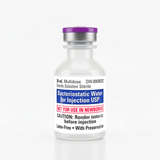
Image Reference: BAC Water Reconstitution Context
Here’s the product image you provided, placed where you’d typically reference reconstitution materials in an instructional post:
Common Mistakes I’ve Seen (and How to Avoid Them)
Mistake 1: Unit mismatch (mg vs mcg, mL vs units)
Some people think the calculator “should handle it,” but if you enter 0.5 thinking it means 0.5 mg while the calculator expects 0.5 mcg, the outputs will be off by orders of magnitude. Treat units like they’re part of the input itself—never an afterthought.
Mistake 2: Mixing up concentration direction
A calculator may let you input either mg/mL or total volume first. If you choose the wrong direction, the reconstitution volume output will not match your intended concentration.
Mistake 3: Not aligning syringe markings with mL
Even with a perfect calculator, syringe markings can cause confusion. I’ve found that teams do better when they confirm injection volume in mL matches what the syringe scale indicates.
Mistake 4: Overreliance on one number without checking
A good process includes sanity checks. For instance, if your concentration implies that a 1 mL injection should be 1 mg, verify that the calculator output makes that relationship true before you proceed.
Practical Checklist Before You Reconstitute
- Confirm vial mass in mg from the label.
- Pick a target concentration (mg/mL) that makes dosing volumes convenient for your syringe.
- Use a peptide calculator for bac water with consistent units.
- Record outputs: total BAC water volume and mg per mL (or mL per dose).
- Sanity-check that injection volume times mg/mL equals dose mg.
- Prepare documentation so you don’t redo math mid-prep.
FAQ
What inputs do I need for a peptide calculator for bac water?
Typically: your peptide vial amount in mg, the target concentration (mg/mL) or your dose per injection, and the diluent volume output you want (usually mL of BAC water). Always confirm the calculator’s unit expectations before submitting.
How do I know the calculator’s injection volume is correct?
Use a simple consistency check: multiply the calculator’s mg per mL by the injection volume (mL). The result should equal your intended dose (mg) for that injection.
Can I use BAC water volume differently and still get the right dose?
Yes. If you change the amount of BAC water you add, the concentration changes, and the injection volume needed to deliver the same dose also changes. A peptide calculator for bac water is designed to recompute those relationships—just keep the inputs consistent.
Conclusion
A peptide calculator for bac water is only as useful as the inputs you provide and the checks you perform. When I plan reconstitution, I focus on unit consistency, choose a concentration that matches syringe measurability, and verify the dose relationship (mg per mL × mL per injection = mg per dose) before any physical prep.
Next step: Pick your intended dose per injection, then run it through a peptide calculator for bac water to generate your exact reconstitution volume and injection volume—write both down before you start.
Discussion